Internship Report > Worklog - AWS Learning Journey > Week 3 - AWS Compute Services > Day 11 - Amazon EC2 Fundamentals
Day 11 - Amazon EC2 Fundamentals
Date: 2025-09-22 (Monday)
Status: “Done”
Lecture Notes
Compute on AWS
Amazon Elastic Compute Cloud (EC2)
- Amazon EC2 provides resizable compute capacity in the cloud, similar to a virtual or physical server.
- It supports workloads such as web hosting, applications, databases, authentication services, and other general-purpose server tasks.
Instance Types
- EC2 configurations are defined by instance types, not custom hardware.
- Each type specifies:
- CPU (Intel, AMD, ARM – Graviton 1/2/3) / GPU
- Memory
- Network
- Storage
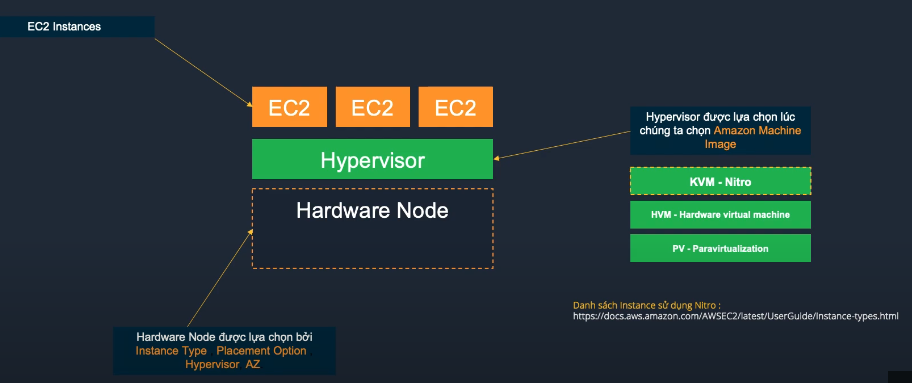
Instance Type Categories:
- General Purpose: T3, T4g, M5, M6i (balanced compute, memory, networking)
- Compute Optimized: C5, C6i, C7g (high-performance processors)
- Memory Optimized: R5, R6i, X2 (fast performance for memory-intensive workloads)
- Storage Optimized: I3, D2, H1 (high sequential read/write to local storage)
- Accelerated Computing: P4, G5, Inf1 (GPU/FPGA for ML, graphics)
Amazon Machine Images (AMI)
- AMI (Amazon Machine Image) is a template that defines the software configuration of an instance, including OS, apps, and settings.
- Types of AMIs:
- Provided by AWS (Amazon Linux, Windows, Ubuntu, etc.)
- AWS Marketplace AMIs
- Custom AMIs created by users
Benefits of Custom AMIs
- Faster instance launch and setup
- Simplified backup and restore
- Consistent environment across multiple instances
AMI Components:
- Root volume template (OS and applications)
- Launch permissions
- Block device mapping
Hands-On Labs
Lab 01 – AWS Account & IAM Setup
- Create an AWS Account → 01-01
- Setup Virtual MFA Device → 01-02
- Create Admin Group and Admin User → 01-03
- Account Authentication Support → 01-04