Internship Report > Worklog - AWS Learning Journey > Week 4 - AWS Storage Services > Day 18 - AWS Snow Family & Hybrid Storage
Day 18 - AWS Snow Family & Hybrid Storage
Date: 2025-10-01 (Wednesday)
Status: “Done”
Lecture Notes
AWS Snow Family
Purpose-built devices and services to move large datasets into and out of AWS when networks are limited or data volumes are massive.
- AWS Snowcone: Small, rugged device (~8 TB). Suited for edge and remote sites.
- AWS Snowball:
- Snowball Edge Storage Optimized: Up to ~80 TB usable storage.
- Snowball Edge Compute Optimized: Adds powerful compute with ~42 TB storage.
- AWS Snowmobile: Exabyte-scale data transfer (up to 100 PB) in a secure containerized data center.
Snow Family Comparison:
| Device | Storage | Compute | Use Case |
|---|---|---|---|
| Snowcone | 8 TB | 2 vCPUs | Edge, IoT |
| Snowball Storage | 80 TB | 40 vCPUs | Data migration |
| Snowball Compute | 42 TB | 52 vCPUs | Edge computing |
| Snowmobile | 100 PB | N/A | Datacenter migration |
When to Use Snow Family:
- Limited or expensive bandwidth
- Large data volumes (TB to PB)
- Remote or disconnected locations
- Edge computing requirements
- Regulatory data residency
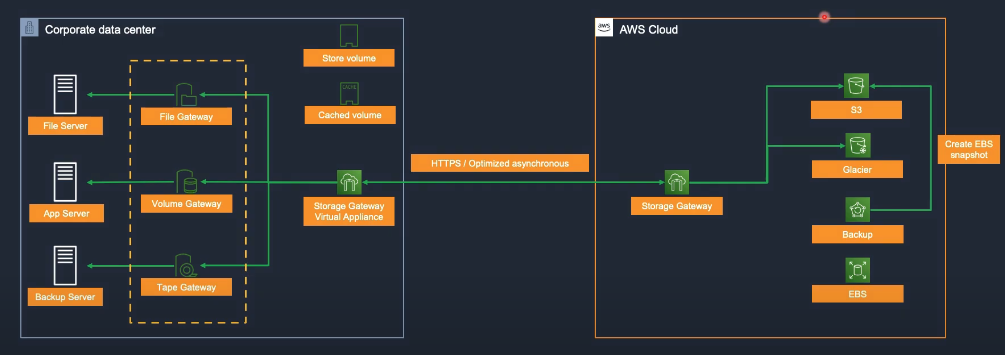
AWS Storage Gateway
Hybrid cloud storage service that connects on-premises applications with cloud-backed storage.
Gateway Types
File Gateway
- NFS/SMB file shares backed by S3 objects.
- Use cases: user shares, application backups, archives.
Volume Gateway
- iSCSI block storage backed by S3 with EBS snapshots.
- Modes:
- Cached volumes: Primary data in S3; local cache on-prem.
- Stored volumes: Primary data on-prem; async copy to S3.
- Use cases: on-prem block workloads with cloud backup/DR.
Tape Gateway
- Virtual Tape Library (VTL) for existing backup apps (e.g., NetBackup, Veeam).
- Writes appear as tape but land in S3/Glacier.
- Use cases: tape replacement and archival modernization.
Hands-On Labs
Lab 24 – AWS Storage Gateway (On-Premises Integration)
- Create Storage Gateway → 24-2.1
- Create File Shares → 24-2.2
- Mount File Shares On-Prem → 24-2.3
- Clean Up Resources → 24-3
Lab 14 – AWS VM Import/Export (Part 1)
- VMware Workstation → 14-01
- Export Virtual Machine from On-Premises → 14-02.1
- Upload Virtual Machine to AWS → 14-02.2