Internship Report > Worklog - AWS Learning Journey > Week 5 - AWS Security & Identity > Day 22 - IAM Policies & Roles
Day 22 - IAM Policies & Roles
Date: 2025-10-07 (Tuesday)
Status: “Done”
Lecture Notes
IAM Policies
- JSON documents defining permissions.
- Types:
- Identity-based policies (attached to principals)
- Resource-based policies (attached to resources)
- Evaluation rule: explicit Deny overrides Allow across all policies.
Pattern to constrain S3 administration:
- Allow all
s3:*actions on a specific bucket. - Explicitly Deny all non-S3 actions.
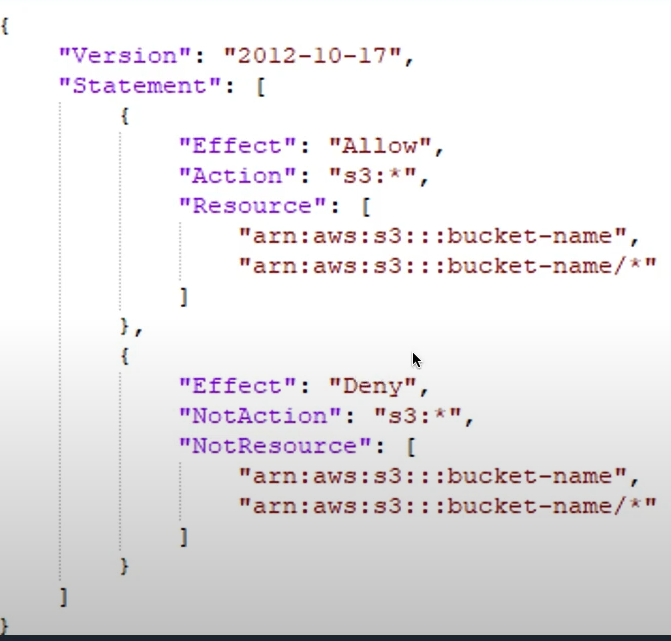
Policy Structure:
{
  "Version": "2012-10-17",
  "Statement": [{
    "Effect": "Allow",
    "Action": "s3:GetObject",
    "Resource": "arn:aws:s3:::my-bucket/*",
    "Condition": {
      "IpAddress": {
        "aws:SourceIp": "203.0.113.0/24"
      }
    }
  }]
}
Policy Evaluation Logic:
- By default, all requests are denied
- Explicit allow overrides default deny
- Explicit deny overrides any allows
- Permissions boundaries limit maximum permissions
IAM Roles
- Roles provide temporary permissions assumed by users, services, or external identities.
- Common use cases:
- Let an AWS service act on your behalf (e.g., EC2 → S3 writes)
- Cross-account access
- Federation from external IdPs
- Credentials for apps on EC2 without storing access keys
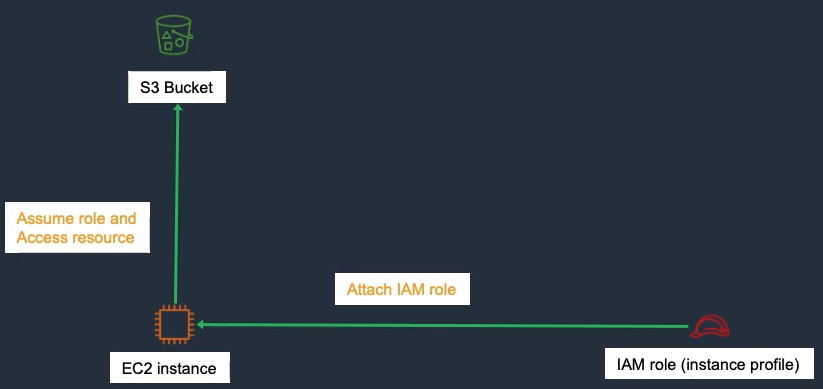
Benefits
- No long-term credentials, short-lived sessions, least privilege, and easier large-scale access management.
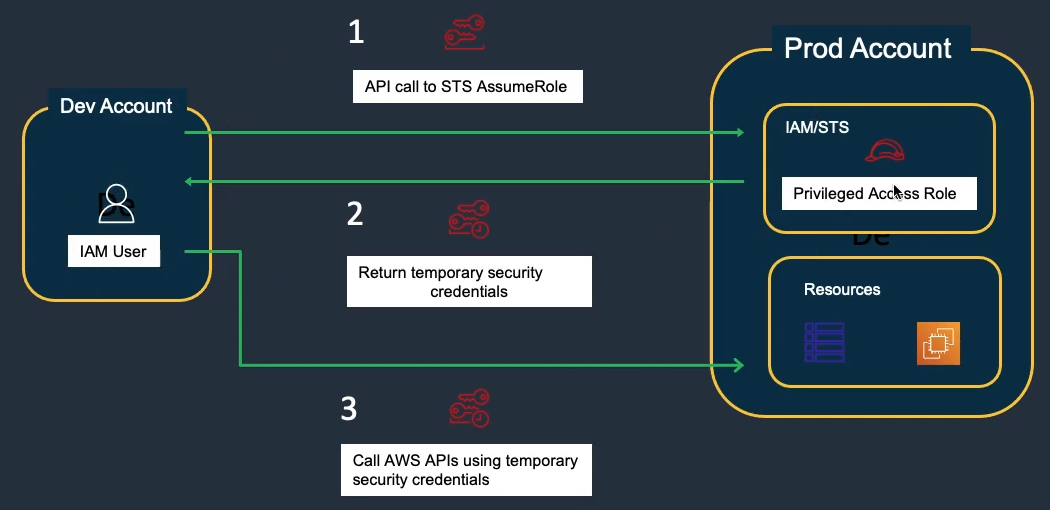
Role Types:
- Service Role: For AWS services (EC2, Lambda, etc.)
- Cross-Account Role: Access resources in another account
- Identity Provider Role: For federated users
- Instance Profile: Container for EC2 instance role
Hands-On Labs
Lab 48 – IAM Access Keys & Roles (Part 2)
- Use Access Key → 48-2.2
- Create IAM Role → 48-3.1
- Use IAM Role → 48-3.2
- Clean Up Resources → 48-4
Lab 28 – IAM Cross-Region Role & Policy (Part 1)
- Create IAM User → 28-2.1
- Create IAM Policy → 28-3
- Create IAM Role → 28-4