Internship Report > Worklog - AWS Learning Journey > Week 5 - AWS Security & Identity > Day 25 - AWS Security Hub & Automation
Day 25 - AWS Security Hub & Automation
Date: 2025-10-10 (Friday)
Status: “Done”
Lecture Notes
AWS Security Hub
- Aggregates and prioritizes security findings and posture across accounts/services.
Capabilities
- Automated checks, normalized findings, prioritized remediation workflows.
- Compliance standards: CIS AWS Foundations, PCI DSS, AWS Foundational Security Best Practices.
Integrations
- GuardDuty, Inspector, Macie, Firewall Manager, IAM Access Analyzer, plus partner tools.
Outcomes
- Less time aggregating, more time fixing; unified visibility and improved security hygiene.
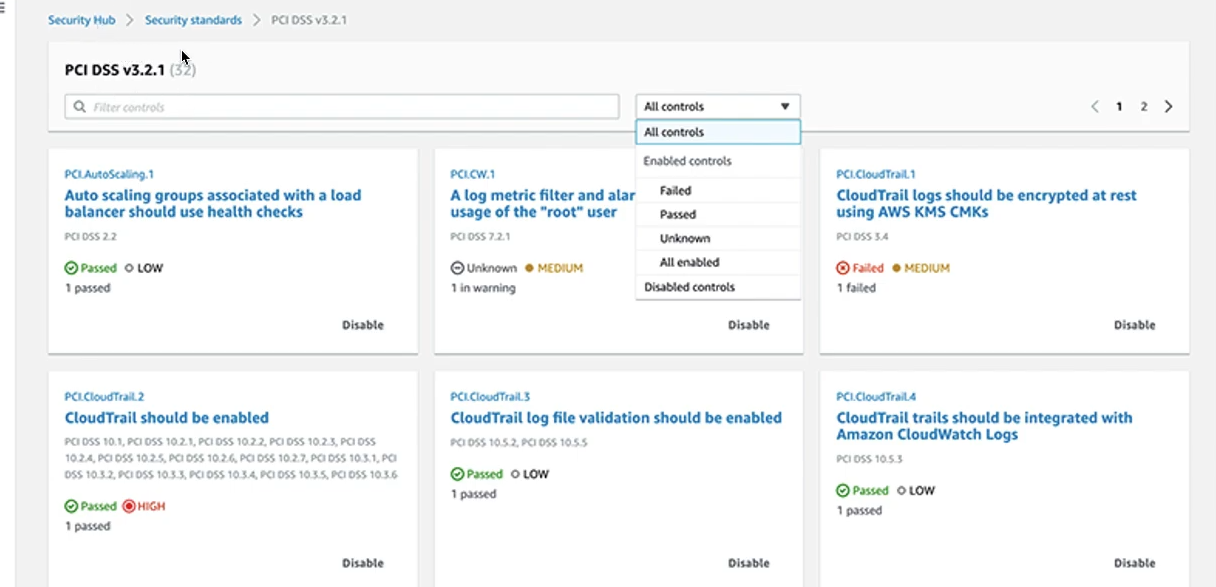
Security Hub Features:
- Continuous security posture monitoring
- Automated compliance checks
- Centralized findings across accounts
- Integration with 50+ AWS and partner services
- Custom insights and dashboards
- Automated remediation with EventBridge
Security Standards:
- AWS Foundational Security Best Practices: 50+ controls
- CIS AWS Foundations Benchmark: Industry best practices
- PCI DSS: Payment card industry standards
- NIST: National Institute of Standards framework
Security Automation
AWS Services for Automation:
- AWS Config: Track resource configuration changes
- Amazon EventBridge: Event-driven automation
- AWS Lambda: Serverless remediation functions
- AWS Systems Manager: Automated patching and compliance
Common Automation Patterns:
- Auto-remediate non-compliant resources
- Automated incident response
- Security group rule validation
- Encryption enforcement
- Tag compliance
Exploration
AWS Certified Security – Specialty: All-in-One Exam Guide (SCS-C01)
- Comprehensive preparation material for the Security Specialty certification.
Hands-On Labs
Lab 18 – AWS Security Hub
- Enable Security Hub → 18-02
- Score for Each Set of Criteria → 18-03
- Clean Up Resources → 18-04
Lab 22 – AWS Lambda Automation with Slack
- Create VPC → 22-2.1
- Create Security Group → 22-2.2
- Create EC2 Instance → 22-2.3
- Incoming Webhooks (Slack) → 22-2.4
- Create Tag for Instance → 22-3
- Create Role for Lambda → 22-4
- Function: Stop Instance → 22-5.1
- Function: Start Instance → 22-5.2
- Check Result → 22-6
- Clean Up Resources → 22-7
Lab 27 – AWS Resource Groups & Tagging (Part 2)
- Use Tags with CLI → 27-2.2
- Create a Resource Group → 27-3
- Clean Up Resources → 27-4
Lab 33 – AWS KMS & CloudTrail Integration (Part 2)
- Create CloudTrail → 33-5.1
- Log to CloudTrail → 33-5.2
- Create Amazon Athena → 33-5.3
- Query with Athena → 33-5.4
- Test & Share Encrypted S3 Data → 33-6
- Resource Cleanup → 33-7
Lab 44 – IAM Advanced Role Control
- Create IAM Group → 44-2
- Create IAM Users → 44-3.1
- Check Permissions → 44-3.2
- Create Admin IAM Role → 44-4.1
- Configure Switch Role → 44-4.2
- Restrict Switch Role by IP → 44-4.3.1
- Restrict Switch Role by Time → 44-4.3.2
- Clean Up Resources → 44-5
Week 5 Summary
- Hoàn thiện bảo mật: Shared Responsibility Model, IAM (user/group/role/policy), KMS.
- Tìm hiểu Cognito, Organizations/SCPs, Identity Center, Security Hub.
- Labs: Security Hub, Lambda Automation, Resource Groups, IAM Policies, KMS & CloudTrail, Advanced Role Control.