Proposal
Online Library – A Serverless Content Platform for Small Groups
1. Executive Summary
The Online Library project aims to build a low-cost serverless platform for storing and distributing content (PDF/ePub) for a small user group (initially ~100 users, primarily students/labs needing controlled internal research-material sharing). The solution prioritizes security, content moderation (Admin Approval), and transparent, linear operating costs as it scales.
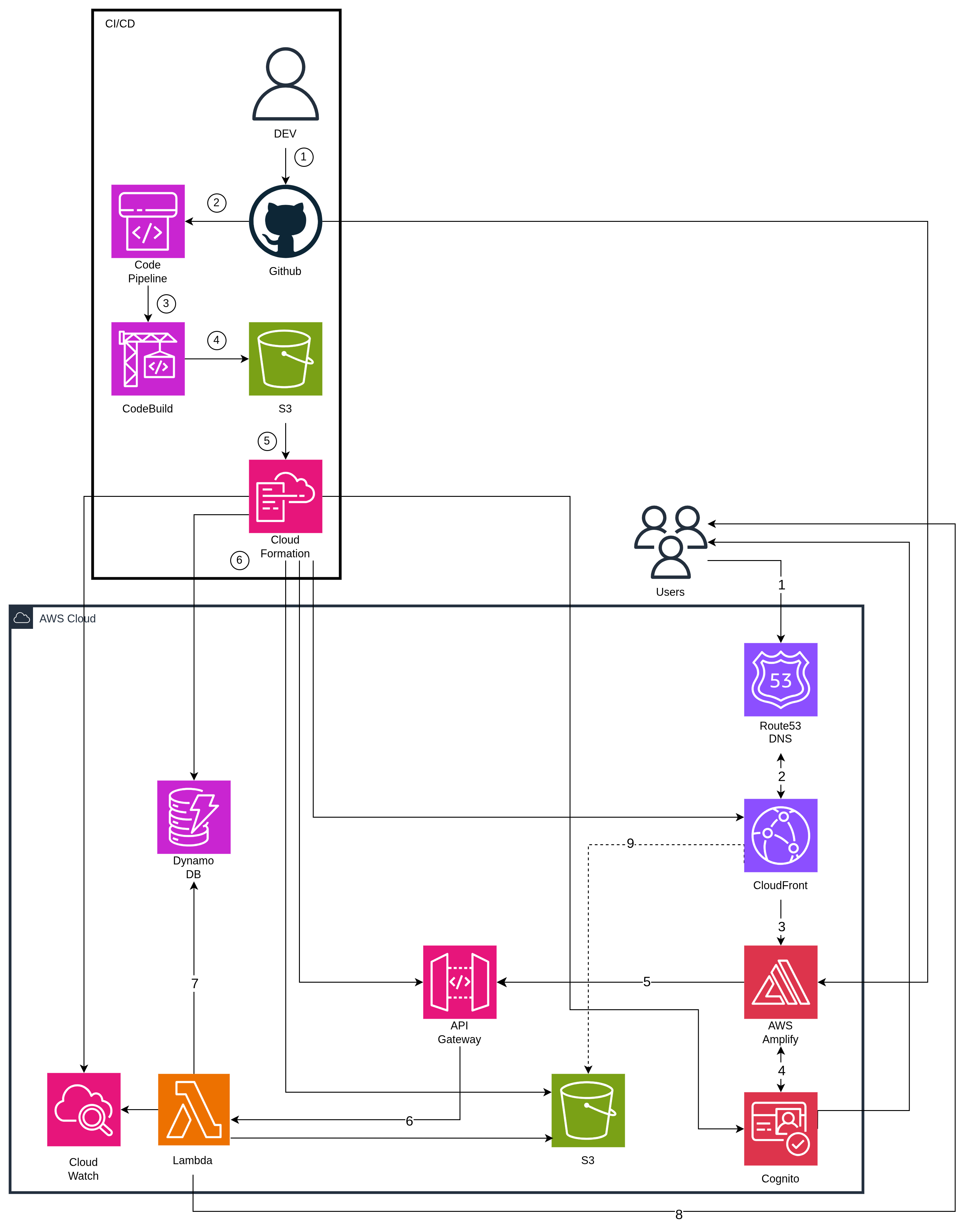
The architecture uses a fully AWS Serverless stack (Amplify, Cognito, API Gateway, Lambda, S3, CloudFront, DynamoDB).
Estimated cost for the MVP (excluding Free Tier) is ≈ $9.80/month, with predictable scaling to 5,000–50,000 users.
2. Problem Statement
What’s the Problem?
Documents and books are scattered; there is no secure content delivery system with access control; the process of adding or moderating user-generated content (UGC) is slow and has high friction.
The Solution:
Build a serverless pipeline on AWS:
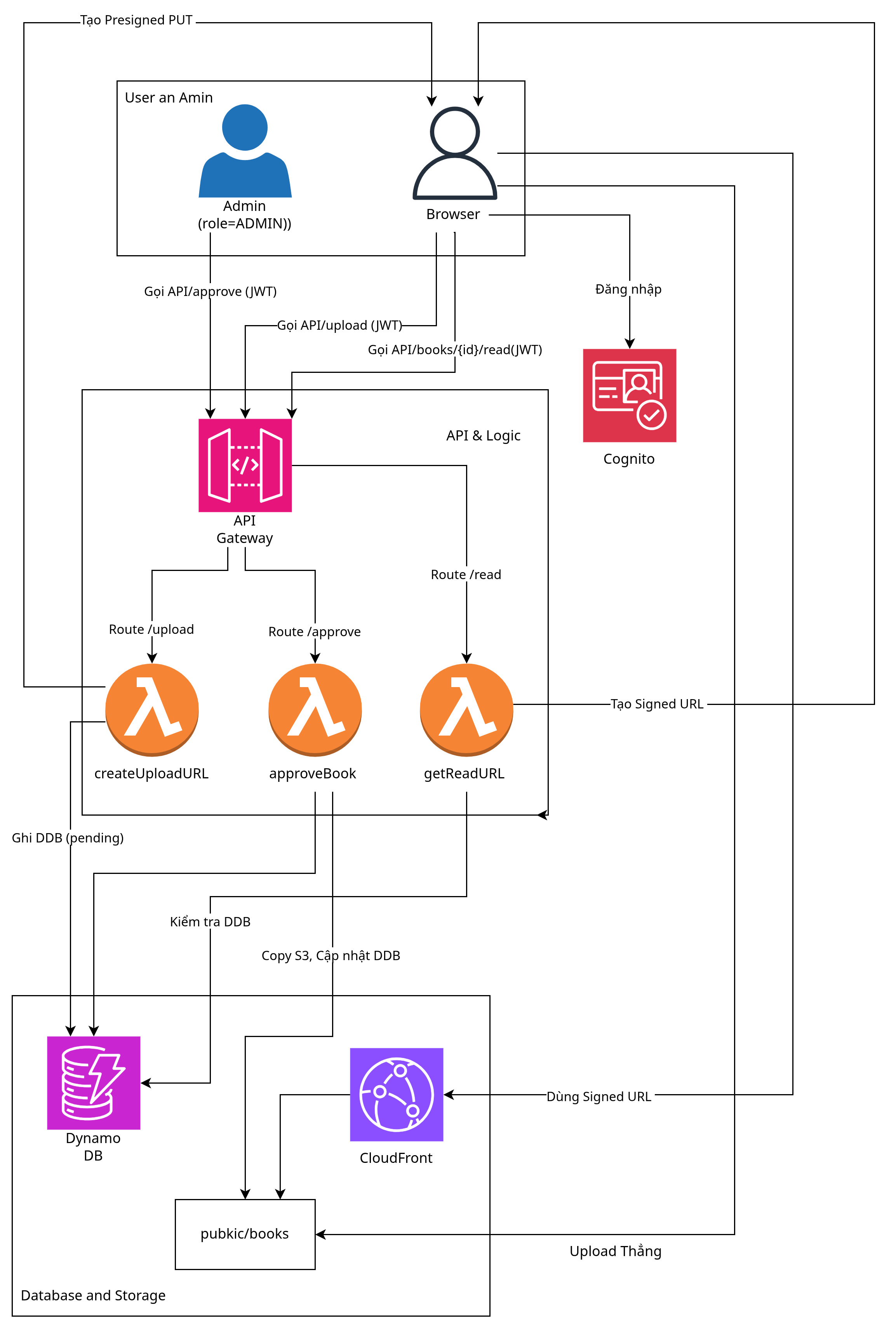
Users upload files via Presigned PUT URL to temporary S3; Admin approves → Lambda moves the file to a protected public folder; Readers access content via Signed GET URL (from CloudFront/CDN) to ensure speed and controlled access.
Benefits and Return on Investment
- Business value: Centralized content; quality control through moderation; fast deployment with CI/CD.
- Technical benefits: Very low operating cost (≈ $9.80/month for MVP); scalable serverless architecture; secured content access.
3. Solution Architecture
A. High level
B. Request flow
AWS Services Used
| Service | Primary Role | Specific Tasks |
|---|---|---|
| Amplify Hosting | CI/CD + FE Hosting | Build & Deploy Next.js, domain management |
| Cognito | Authentication | Sign-up/Login, JWT issuance, refresh tokens |
| API Gateway | API Entry Point | Receive requests, validate JWT, route to Lambda |
| Lambda | Business Logic | Handle upload/approval, generate signed URLs, write metadata |
| S3 | Object Storage | Store original and approved files, served via CloudFront Signed URL |
| CloudFront | CDN | Fast content delivery, blocks direct S3 access via OAC |
| DynamoDB | Database | Store metadata (title, uploader, approval status) |
| Route 53 | DNS | Domain mapping to Amplify, API Gateway, CloudFront |
| CloudWatch | Monitoring | Lambda logs, anomaly alerts |
Search
Simple search fields (titles, author) using DynamoDB GSIs.
Component Design
- User Upload: Presigned PUT to S3
uploads/. - Admin Approval: Lambda copies file from
uploads/→public/books/upon approval. - Reader Security: CloudFront OAC prevents direct S3 access; reading occurs only through Signed URL generated by Lambda.
Search Architecture
- Simple Search:
- Design GSI for
titleandauthor(example:GSI1: PK=TITLE#{normalizedTitle}, SK=BOOK#{bookId};GSI2: PK=AUTHOR#{normalizedAuthor}, SK=BOOK#{bookId}). - Add endpoint
GET /search?title=...&author=...to query GSI instead ofScan.
- Design GSI for

Admin Authorization
- Use Cognito User Groups with an
Adminsgroup. - Admin JWT contains
cognito:groups: ["Admins"]. - Admin-specific Lambdas (example
approveBook,takedownBook) check this claim and return403 Forbiddenotherwise. - JWT Authorizer (API Gateway HTTP API) handles authentication, while authorization logic is inside Lambda.
4. Technical Implementation
Implementation Phases
- Design & IaC: Use CDK to define all stacks (Cognito, DDB, S3, Amplify, Lambda, API).
- Upload & Approval Flow: Implement Presigned PUT, metadata (status=
PENDING), Admin approval logic. - Reading Flow: Implement Signed GET, FE reader stream via CloudFront.
- Ops: CloudWatch logs, budget alerts, IAM hardening.
- Search: Add GSI for
title,author, implementGET /search.
Technical Requirements
- Entire infrastructure defined using CDK.
- API Gateway uses HTTP API for cost savings.
- Lambda (Python) handles business logic & DynamoDB/S3.
- S3 Bucket Policy must deny public access and allow only CloudFront OAC.
5. Timeline & Milestones
Project Timeline
Platform & Authentication (Week 1–2)
Objective: Set up infrastructure and allow user login.
- Backend Tasks (CDK/DevOps):
- CDK/IaC stack for Cognito.
- CDK stack for DynamoDB (main table, no GSI yet).
- CDK stack for S3 (
uploads,public,logs) + OAC. - Deploy API Gateway (HTTP API) + a test Lambda.
- Frontend Tasks (Amplify):
- Configure Amplify Hosting + GitHub CI/CD.
- Integrate Amplify UI / Cognito SDK for: Sign-up, Email verification, Login, Forgot password.
- Milestone:
git pushautomatically deploys FE.- User can sign-up/login and obtain JWT.
Upload & Approval Flow (Week 2–3)
Objective: Allow authenticated users to upload files and Admins to approve them.
- Backend (Lambda/CDK):
- Implement
createUploadUrlLambda:- Validate JWT.
- Create Presigned PUT URL to
uploads/. - Write metadata (status=
PENDING).
- Implement
approveBook:- Validate Admin role.
- Copy S3 file
uploads/→public/books/. - Update DynamoDB status (
APPROVED).
- Implement
- Frontend:
- Upload form (drag & drop).
- Upload via Presigned PUT.
- Admin dashboard with list of
PENDING, button “Approve”.
Reading & Search (Week 3–4)
Objective: Allow reading & searching approved books.
- Backend:
- Implement
getReadUrl: generate Signed GET URL (short TTL). - Add GSI for
title,author. - Implement
searchBooks.
- Implement
- Frontend:
- Homepage: book list.
- Search bar → API
searchBooks. - Reader screen using the Signed URL (e.g., via
react-pdf).
Ops & Security (Week 5–6)
- Backend:
- S3 Event Notification for new uploads.
- Lambda
validateMimeType: read magic bytes to verify PDF/ePub. - Lambda
takedownBook(Admin),deleteUpload(auto cleanup after 72h).
- DevOps:
- AWS Budget Alerts, CloudWatch Alarms.
- IAM least-privilege + CORS tightening.
6. Budget Estimation
Budget comes from AWS Pricing Calculator.
Monthly cost (strict, no Free Tier, ~100 users): ≈ $9.80/month.
| # | AWS Service | Region | Monthly (USD) | Notes |
|---|---|---|---|---|
| 0 | Amazon CloudFront | Asia Pacific (Singapore) | 0.86 | 10 GB data egress + 10 000 HTTPS requests |
| 1 | AWS Amplify | Asia Pacific (Singapore) | 1.31 | 100 build min + 0.5 GB storage + 2 GB served |
| 2 | Amazon API Gateway | Asia Pacific (Singapore) | 0.01 | ~10 000 HTTP API calls/tháng |
| 3 | AWS Lambda | Asia Pacific (Singapore) | 0.00 | 128 MB RAM × 100 ms × 10 000 invokes |
| 4 | Amazon S3 (Standard) | Asia Pacific (Singapore) | 0.05 | 2 GB object storage for books/images |
| 5 | Data Transfer | Asia Pacific (Singapore) | 0.00 | Included in CloudFront cost |
| 6 | DynamoDB (On-Demand) | Asia Pacific (Singapore) | 0.03 | Light metadata table (0.1 GB, few reads/writes) |
| 7 | Amazon Cognito | Asia Pacific (Singapore) | 5.00 | 100 MAU, Advanced Security enabled |
| 8 | Amazon CloudWatch | Asia Pacific (Singapore) | 1.64 | 5 metrics + 0.1 GB logs/tháng |
| 9 | Amazon Route 53 | Asia Pacific (Singapore) | 0.90 | 1 Hosted Zone + DNS queries |
| ≈ 9.80 USD / month | No Free Tier applied |
Infrastructure Costs
This cost model demonstrates the efficiency of serverless architecture: costs are primarily centered on the value delivered to the user (Cognito MAU), rather than paying for ‘idle servers’.
7. Risk Assessment
Risk Matrix
| Risk | Impact | Mitigation |
|---|---|---|
| Cost spike due to sudden user growth | High | Limit MAU, cache metadata via CloudFront |
| Abuse of uploads | Medium | Limit ≤ 50MB; auto-delete after 72h |
| Fake/malicious file types | Medium | S3 Event → Lambda MIME validation |
| Monitoring overload | Low | CloudWatch alerts, 14-day retention |
Mitigation Strategies
- cost:
- Set AWS Budget Alerts for CloudFront and Cognito.
- Be aware that Signed URLs have a short TTL and should not be cached publicly long-term; instead, cache metadata/API responses (book lists, details) on CloudFront for 3–5 minutes to reduce API load.
- Only generate Signed URLs when the user actually clicks to read (on-demand), do not pre-generate for the entire list.
- Upload:
- Limit file size to ≤ 50MB for MVP. (Can be increased to 200MB if needed, use multipart upload on the FE to avoid timeouts.)
- Apply Rate Limit/Throttling on API Gateway for endpoints that create Presigned URLs.
- Set up an S3 Lifecycle Policy to automatically delete unapproved files in
uploads/after 72h. - Add Server-side Validation: S3 Event Notifications $\to$ Lambda reads magic bytes (e.g.,
file-typelibrary) to verify correct PDF/ePub; if incorrect, automatically delete and writeREJECTED_INVALID_TYPEstatus to DynamoDB.
- Copyright (DMCA):
- Store Audit Log in DynamoDB:
uploaderID,uploadTimestamp,adminApproverID,approvalTimestampfor traceability. - Build a Takedown API (Admin only): update status to
TAKEDOWN; optionally move the object frompublic/books/toquarantine/books/(do not delete completely) to preserve traces.
- Store Audit Log in DynamoDB:
Contingency Plans
If costs exceed budget, enable Invite-Only mode to cap Cognito MAU and reduce load.
8. Expected Outcomes
Technical Improvements
- Fast and secure content delivery (CDN + Signed URL).
- Standard AWS Serverless architecture capable of scaling to 50,000 users without redesign.
- Fully automated CI/CD for both frontend & backend.
Long-term Value
- A centralized content platform for structured book data.
- Continuous documentation of an end-to-end Serverless implementation.
- Room for future analytics (QuickSight) or AI/ML features.
This system proves the ability to build a platform that securely, cost-effectively, and scalably easy by AWS Serverless services - that suitable to apply for small groups or communities.